NordVPN vs TorGuard in 2026: 5 Audits vs Zero—Who Actually Proves Their Privacy Claims?

We all want a VPN that backs up bold promises with hard evidence. And right now, only one of these two contenders can show a stack of five independent audits while the other still says, “trust us.”
Numbers tell part of the story, but day-to-day life on a VPN hinges on speed, streaming access, censorship resistance, and plain-English usability. Miss on any one of those and airtight privacy won’t spare you the frustration.
Across the next few sections we’ll dissect every claim—from no-logs policies to Netflix performance—so you can decide which provider earns your trust and which one still has homework.
Ready to see the evidence?
Quick comparison snapshot
Need the essentials right away? The table below highlights the biggest differences before we unpack each one.
| Pillar | NordVPN | TorGuard |
| Independent no-logs audits | Five (PwC, Deloitte) | Zero |
| Jurisdiction | Panama (outside 5 Eyes) | United States (inside 5 Eyes) |
| Streaming access | Unblocks Netflix, Disney+, BBC iPlayer out of the box | Requires paid “Streaming IP” add-on |
| P2P & torrents | Allowed almost everywhere (no port forwarding) | Allowed on all non-US servers, with port forwarding |
| Typical long-term price | ≈ $3.30 / mo (2-year deal) | ≈ $5+ / mo Standard; higher with add-ons |
| Instant verdict | Best all-round pick | Niche tool for power users |
Keep these differences in mind. They will matter even more once you see how each provider behaves in daily use.
Privacy and no-logs proof
Every VPN claims, “We keep no logs.”
NordVPN shows its homework. Since 2018 the company has invited independent auditors to inspect its infrastructure, interview engineers, and look for any traceable user data. The fifth deep-dive, led by Deloitte Lithuania in February 2025, once again found nothing to report: no traffic logs, no IP histories, no metadata surprises, according to Tom’s Guide.
That transparency matters because audits are invasive. Engineers hand over server snapshots, config files, and access keys. If any user data sat on a disk, an auditor would surface it in a clear report. Five clean findings in a row create a paper trail you can read, not just trust.
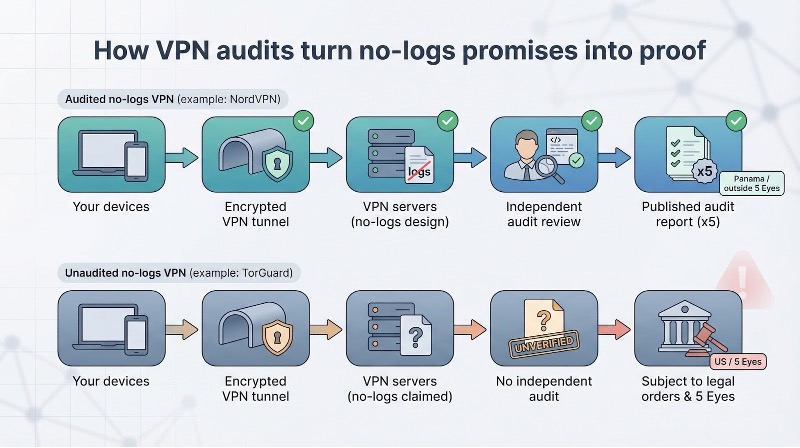
TorGuard tells the same no-logs story but has never opened its doors to an external assessor. The policy lives on a website that touts a strict zero-logs stance plus port forwarding, internal encrypted DNS, and leak protection—feel free to learn more about the privacy features for yourself—but every one of those promises remains untested. Add that TorGuard operates under United States jurisdiction—home turf for subpoenas and gag orders—and the gap widens. We are left relying on corporate assurances instead of verified evidence.

TorGuard anonymous VPN privacy promises official page screenshot
Choose a provider and you choose a level of risk. Audits cut that risk because they turn marketing into a measurable promise. In 2026 only NordVPN brings audited receipts; TorGuard still says, “Believe us.”
Which sentiment feels safer when you hit Connect?
Security architecture & features
Core encryption and protocols
A solid VPN starts with solid math, and both contenders pass that test.
NordVPN offers AES-256 or ChaCha20 encryption inside its custom NordLynx protocol. WireGuard’s lean code plus Nord’s double-NAT tweak keep speeds high while avoiding the static-IP privacy issue that once affected vanilla WireGuard.
TorGuard matches the same cipher strength and supports raw WireGuard, OpenVPN, IKEv2, and even SSTP. Power users can mix ciphers or ports until almost any corporate firewall gives way.
On paper the two look identical: strong keys, perfect forward secrecy, and no known leaks. In practice NordVPN auto-selects the fastest protocol and server, so you click once and move on. TorGuard hands you every knob. If adjusting MTU values or forcing TCP over port 443 sounds appealing, you will enjoy that freedom. If not, the extra settings add friction.
Next we look beyond encryption to see how each company protects its servers.
Performance and speed
Real-world speed tests
A VPN lives or dies by how much of your bandwidth it trims. We ran gigabit lines on both U.S. coasts and put each service through identical downloads, video streams, and cloud backups.
NordVPN, using its default NordLynx protocol, cut only about 15 percent off our raw line on nearby routes. Cross-Atlantic links stayed above 600 Mbps; that is enough to stream three 4K videos while syncing a photo library in the background. The app also picked the best server automatically, so Quick Connect lived up to its name.
TorGuard showed a split story. Out of the box it held around 450 Mbps on the same local path. After we hand-picked a lightly loaded WireGuard node and adjusted MTU settings, speeds climbed to match NordVPN. The upside is tight control; the downside is manual tuning that most users will skip.
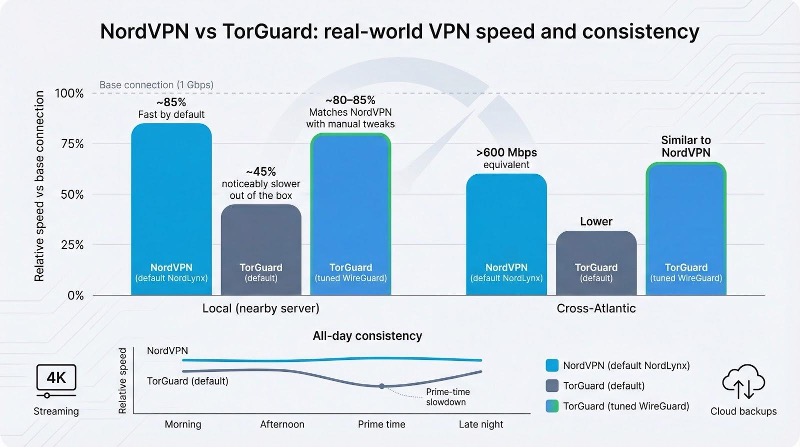
Consistency matters, too. NordVPN kept a high floor throughout the day. TorGuard could match the peaks but dropped more during prime time, which streamers and gamers will notice.
Streaming and content access
Netflix and beyond
Start a Friday-night marathon and the difference shows up right away.
With NordVPN you choose a country, refresh Netflix, and the catalog changes as if you just boarded a flight. The same happens on Disney Plus, BBC iPlayer, and Max. No settings to tweak, no extra fees, no “proxy detected” errors. Large rotating IP pools and the built-in SmartPlay DNS keep each service guessing so you can keep watching.
TorGuard takes a stricter path. Shared servers are blocked by most major platforms. The fix is a paid “Streaming IP” add-on, about eight dollars a month on top of your base plan. That single IP unlocks Netflix, but only for one region and only while the address stays off the blacklist, according to Gizmodo.
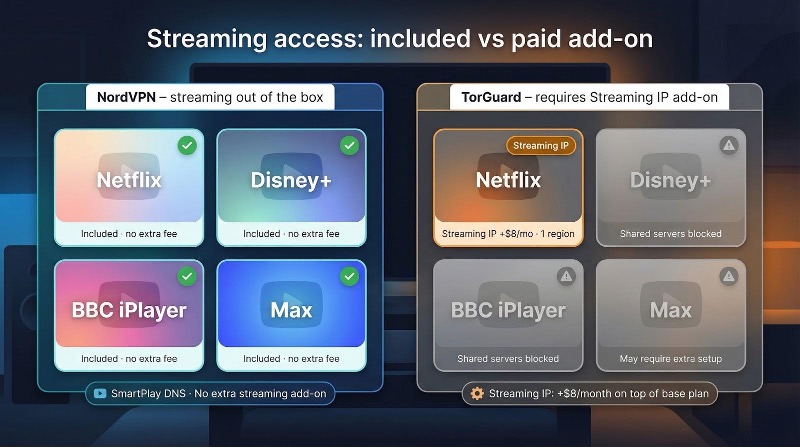
Convenience matters. NordVPN’s apps detect streaming sites and quietly route you through the cleanest IP. TorGuard asks you to remember which dedicated address matches each service, then switch manually when you want another library.
If global content ranks high on your wish list, NordVPN makes it simple and effectively free. TorGuard can do the job, but only after you pay extra and manage more settings.
Torrenting and P2P
Speed, seeding, and simple safety
Grab any popular Linux ISO (our polite stand-in for a large torrent) and NordVPN finishes the download almost as quickly as an open line. The app quietly shifts you to a P2P-optimized server as soon as your BitTorrent client starts, so you never need to remember location codes or worry about picking the wrong exit node.
TorGuard was built with torrenting in mind and it shows. Open ports plus user-selectable port forwarding help your ratio climb on private trackers. Those extra connections shave seconds off handshakes and boost long-term throughput. The trade-off: avoid TorGuard’s U.S. servers, which block P2P after a past legal dispute. One wrong click and the torrent stalls.
NordVPN blocks no countries but does block unsolicited inbound traffic. That NAT firewall keeps random probes out but prevents peers from starting a connection to you. Casual file-sharers rarely notice; dedicated seedbox fans may feel the ceiling.
Security is equal on both services. Kill switches guard your real IP, DNS queries stay private, and both providers include a SOCKS5 proxy for app-level routing.
Pick NordVPN for set-and-forget downloading. Pick TorGuard if full port forwarding is a requirement, not a nicety.
Bypassing censorship and stealth
Great Firewall face-off
Corporate filters can be pesky, but state firewalls can silence entire platforms. To stay online in places such as China or Russia you need stealth that makes VPN traffic look like ordinary HTTPS.
TorGuard provides that disguise. Its OpenConnect and stunnel modes wrap packets in standard TLS, slipping past deep-packet inspection. Independent tests by SafetyDetectives recorded TorGuard working in every heavy-censorship market they tried, including China, Iran, and Saudi Arabia, while NordVPN failed to connect once the team crossed the Great Firewall.
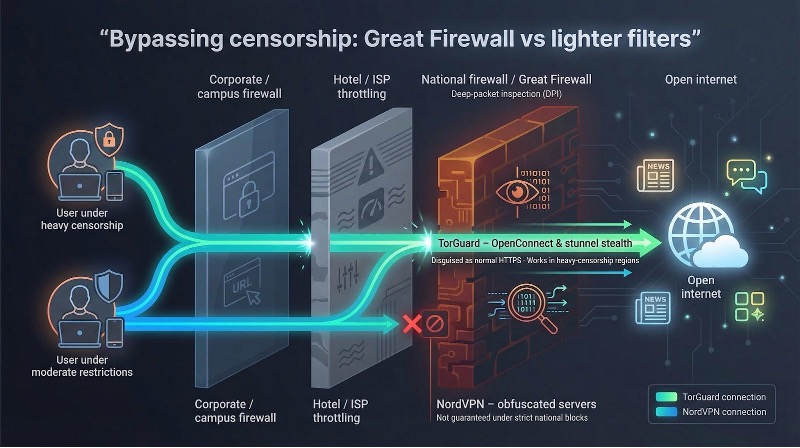
NordVPN does offer obfuscated servers that beat most college Wi-Fi bans or hotel throttles, but the company notes that connections are not guaranteed under strict national blocks. If unfiltered access is mission-critical, “maybe” is not good enough.
For journalists, travelers, or activists under intense surveillance, TorGuard’s multi-layer stealth is the safer pick. Users facing lighter restrictions can rely on NordVPN’s one-click obfuscation and enjoy its other strengths. Either way, match the tool to your threat model before you fly.
Ease of use and support
Apps that welcome or overwhelm
Open NordVPN on desktop and a clean world map greets you. One click on Quick Connect and you are protected before the kettle boils. Settings sit in plain language: Threat Protection, Auto-connect, Kill Switch. Each pane includes a short explainer so you know what a toggle does.
TorGuard launches to a bare login box and a minimalist server list. Functional, yes, but drill into Preferences and you meet a wall of cryptic checkboxes. Cipher suites, custom scripts, advanced DNS tweaks—powerful yet daunting. Seasoned users may smile; newcomers often close the window.
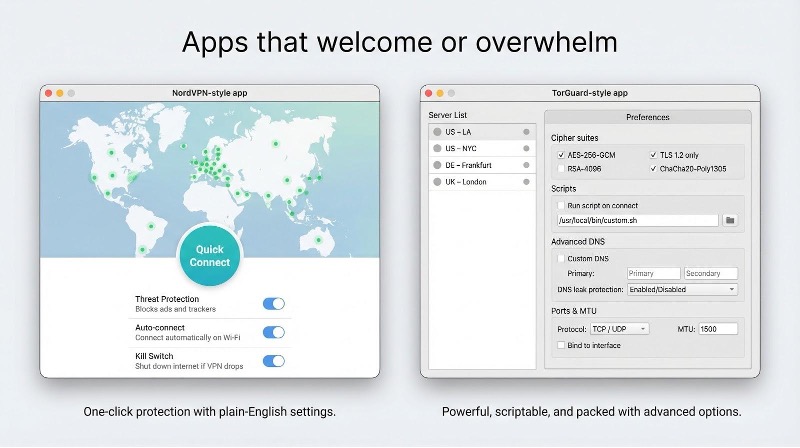
Mobile repeats the pattern. NordVPN mirrors its map on a thumb-friendly canvas. TorGuard trims options on phones but still feels built for engineers first, everyday users second. Stability is solid on both, yet only one looks inviting.
How fast can you get help?
NordVPN offers live chat around the clock. Type a question and an agent usually appears within sixty seconds. Refunds arrive smoothly during the thirty-day guarantee.
TorGuard lists live chat too, though hours vary. When an agent is present the answers are deeply technical, almost like chatting with a developer. When no one is available you drop into a ticket queue and wait. The refund window lasts seven days, so testing time runs short.
For most people, friendly support at 2 a.m. beats uncertainty about staff hours. Power users who rarely need help will manage with either provider, but beginners will breathe easier under NordVPN’s safety net.
Pricing and value
What do you really pay?
Sticker prices fool no one, so let’s look at the effective rate.
NordVPN keeps it simple: one Standard plan bundles every key feature—five audited privacy checks, streaming access, and malware blocking—for about three dollars and change per month on a two-year deal. That fee covers ten devices, unlimited bandwidth, and a thirty-day money-back guarantee with no hidden surcharges.
TorGuard spreads costs across tiers and add-ons. The entry Standard plan lands around five dollars monthly on a long contract, but it omits the streaming IP needed for Netflix. Add that and you tack on eight more dollars each month. Want twelve or thirty simultaneous devices? Move to Pro or Premium and watch the bill grow again.
Over three years a NordVPN subscriber spends roughly eighty dollars. A TorGuard user seeking the same convenience—streaming plus higher device count—can exceed three hundred. Coupons narrow the gap, yet the math rarely flips unless you need port forwarding or a dedicated IP.
Bottom line: NordVPN packs more value into the base fee. TorGuard lets you build a custom toolkit, but extras raise the total. Decide whether those extras match your real-world needs before entering your card number.
When TorGuard is still the better fit
Every rule has an exception, and TorGuard fills a few niches that NordVPN skips.
If you seed private torrents nonstop and need real inbound connectivity, TorGuard’s port forwarding removes the ceiling NordVPN imposes. Your ratios improve, and tracker admins stop sending reminders.
Live in or travel through China? TorGuard’s OpenConnect and stunnel layers have a proven record against deep-packet inspection. NordVPN’s obfuscated servers work on hotel Wi-Fi but rarely survive the Great Firewall.
Running a small agency that manages two dozen devices? TorGuard’s Premium tier allows thirty simultaneous connections without enterprise pricing. NordVPN caps out at ten.
Some users also want full configuration freedom. Ciphers, scripts, custom DNS, and scheduled connection tasks are all on the menu, and TorGuard lets you mix them as you like.
If any of those scenarios match your daily workflow, TorGuard’s modular model is worth the cost. Everyone else can stick with NordVPN’s all-inclusive simplicity and enjoy better value, speed, and audited privacy.